What are the most important JD Edwards support issues to fix first?
The most common JD Edwards support issues include: undocumented customizations, access control drift, and delayed security patching.
With weak backup practices, integration brittleness, and single-point-of-failure support models rounding out the list.
Most are detectable before they become outages, but only if your support team is actively monitoring for them.
What JD Edwards Support Issues Really Look Like in 2026
What catches IT directors off guard?
The old problems that nobody tracked.
- The undocumented script a developer left running.
- The integration passed all tests in dev, but broke in production.
- The CNC runbook has not been updated after the last configuration change.
These are the places where JD Edwards support issues take hold, not in the ticket queue, but in the gaps between the tickets.
Oracle continues to ship quarterly Critical Patch Updates, and EnterpriseOne 9.2 remains on Premier Support through at least December 2037.
That’s meaningful platform longevity.
It also raises the bar for what “good support” really means in 2026.
Why Proactive JD Edwards Support Matters More Now
The cost of unplanned downtime has climbed year over year, and the causes haven’t changed much.
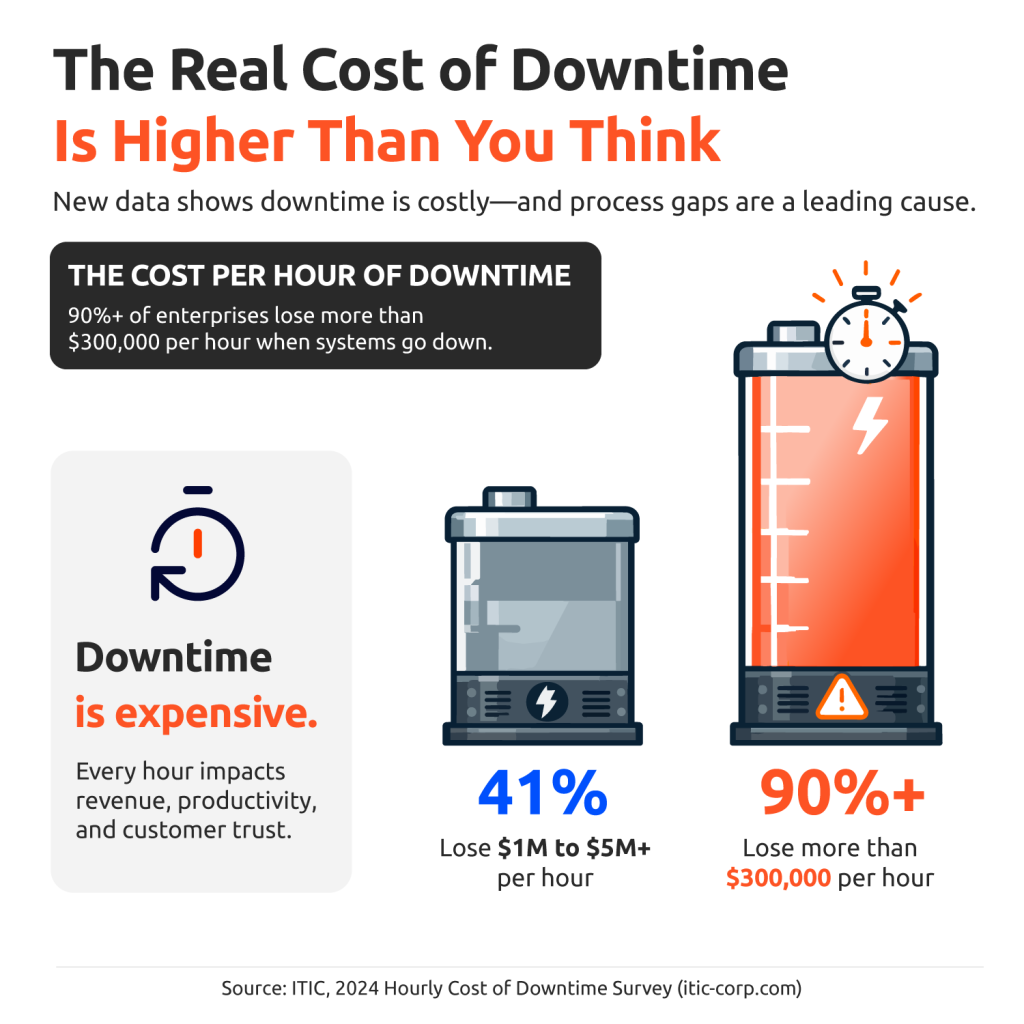
90%+ of enterprises lose more than $300,000 per hour of downtime.
41% put that cost at $1M to $5M or more per hour.
Source: ITIC, 2024 Hourly Cost of Downtime Survey
The cause isn’t always a cyberattack or hardware failure.
Uptime Institute’s 2025 Annual Outage Analysis found that failure to follow procedures is now one of the leading drivers of serious outages.
Process drift, missed documentation, and gaps in operational discipline are where most downtime starts.
That’s the case for proactive JD Edwards support: structured, documented, and tied to business continuity.
A faster response when things break is useful.
Not needing to respond at all is better.
The Top 12 JD Edwards Support Issues to Resolve Proactively
Most JDE environments don’t fail because of some rare, impossible-to-predict technical event.
They fail because a small problem went unnoticed long enough to become a big one.
These are the 12 JD Edwards support issues that show up most in real environments, what causes them, and what a good support team does before they become your Friday night.
1. Undocumented Scripts and Custom Dependencies
Symptom: Something’s running in production, and no one on the current team can tell you what it does, what it connects to, or who built it. The person who knows left.
Likely Cause: Custom objects are built quickly under deadline pressure, and documentation is skipped. Then someone leaves, and that script becomes a mystery box nobody wants to open before an upgrade.
Proactive Fix: A living inventory of every customization in your environment, updated every time something changes, not just before an audit. Each custom object needs a documented purpose, a list of what it connects to, and a person whose name is attached to it.
2. Identity, LDAP, and Access Drift
Symptom: An employee who left six months ago still has an active JDE role, and a shared admin login is floating around the team. Elevated access that was supposed to be temporary never got cleaned up.
Likely Cause: Access provisioning is usually manual and disconnected from HR. Nobody gets a calendar reminder to revoke roles when someone exits. Reviews only happen when an auditor forces the issue.
Proactive Fix: Quarterly access reviews, de-provisioning tied directly to HR offboarding, and real limits on who can hold elevated privileges. This is the first place an auditor looks, and it’s the hardest thing to explain when the honest answer is “we just never got around to it”.
3. Storage and Capacity Planning Gaps
Symptom: Batch jobs fail at month-end close. A log directory reaches capacity without warning. The hosting bill spikes at the end of the quarter, and nobody can explain why.
Likely Cause: Storage was sized at implementation based on the business as it was at the time. The business grew. The thresholds didn’t. Nobody went back to update the math.
Proactive Fix: Capacity reviews tied to how the business actually runs, not last year’s assumptions. Month-end close, payroll runs, and peak shipping weeks, along with their cycles, belong in the model. The storage surprise is almost always visible in the trend data weeks out, if someone’s paying attention.
4. Environment Drift and Certification Gaps
Symptom: A patch goes through testing cleanly, then breaks in production. Dev, test, and prod are supposed to match, but somewhere along the way, they stopped.
Likely Cause: Environments drift when people make small changes without going through a formal process. One ad hoc fix here, one skipped step there, and over time, the environments are living completely separate lives.
Proactive Fix: A documented baseline for each environment and a change-control process that people actually follow. Your CNC team should own environment parity as a core responsibility. Every change tested in dev needs to be tracked all the way to production.
5. Security Patching and CPU Delays
Symptom: A Critical Patch Update is flagged for testing, and another quarter passes without it being applied. The exposure stacks up quietly, and nobody’s calendar shows it as overdue.
Likely Cause: Applying patches isn’t a one-person job. It takes coordination across application, database, and infrastructure teams. Without a standing cadence that everyone owns, it keeps getting pushed, and then pushed again.
Proactive Fix: A rolling patch calendar with defined test windows and clear owners at each step. Ponemon Institute research found that organizations take an average of more than 40 days to apply a high-priority patch after it’s been identified. That window is where most security incidents start.
6. Weak Backup and Recovery Practices
Symptom: Backups run on schedule. The logs show green. But nobody has tested an actual restore in months, and the recovery targets in the documentation have never been validated against a real drill.
Likely Cause: Backup testing happens at implementation, gets signed off, and drops off the calendar. It starts to feel like a solved problem, right up until it isn’t.
Proactive Fix: Scheduled restore tests against your actual RTO and RPO targets, with results tracked over time. IDC research found that 43% of organizations have experienced data loss directly from outages. A backup that runs every night but fails on restore isn’t a backup. It’s a false sense of security.
7. Performance and Batch Window Instability
Symptom: Jobs that used to wrap up by 5 am are finishing at 9 am. Users are noticing the system feels slower than it used to. Finance is flagging that their reports aren’t ready when needed.
Likely Cause: Batch performance degrades slowly. Database statistics go stale, query plans shift, job queues fill up differently than they once did. Without a baseline to compare against, nobody sees the slowdown coming until it’s already affecting the business.
Proactive Fix: Capture batch performance baselines when the system is healthy. Set monitoring on job duration trends. Schedule query tuning before problems surface, not after. Performance drift always shows up in the data first. The question is whether anyone’s watching.
8. Integration Brittleness
Symptom: A trading partner updates their EDI format and a feed breaks. A middleware job stops processing, and nobody gets an alert. Finance and Operations are looking at different numbers and can’t decide which to trust.
Likely Cause: Integrations get built, go live, and get handed off with no one clearly responsible for them afterward. When something changes upstream, the downstream impact doesn’t surface until the data is already wrong.
Proactive Fix: Documented interface maps for every connection in and out of JDE, active monitoring on each feed, and a clear owner for what happens when something fails. JDE rarely runs alone in a tech stack. Integrated health is system health.
9. Outdated Browser, OS, and Database Dependencies
Symptom: Users are on browsers that aren’t on the current Minimum Technical Requirements list. Servers are running OS versions that Oracle no longer certifies. Nobody flagged it because nobody was tracking it.
Likely Cause: Staying current with MTR changes requires coordination across JDE administration, infrastructure, and end-user computing. Without a regular review process, the environment quietly drifts out of certification while everyone assumes someone else is watching.
Proactive Fix: A quarterly MTR check against current certifications, every quarter, no exceptions. Falling off the certified stack narrows your support options fast. Getting back into compliance is significantly harder than staying there.
10. Reporting and Data Trust Issues
Symptom: Finance runs three reports to answer one question and gets three different numbers. People start building their own spreadsheets because they’ve stopped trusting what JDE produces.
Likely Cause: Nobody owns the reports. Reconciliation is informal. There’s no process for validating what JDE outputs against source data. Over time, the system becomes something people work around rather than work with.
Proactive Fix: Documented report ownership, regular data reconciliation, and user training that rebuilds real confidence in what the system produces. Gartner estimates that poor data quality costs organizations an average of $12.9 million per year. The Finance spreadsheets aren’t the problem. They’re a symptom of one.
11. Single-Point-of-Failure Support Models
Symptom: One person on the team knows how everything works: the CNC configuration, the customizations, the undocumented quirks that only make sense if you were there when it was built. The runbook either doesn’t exist or describes a system from two years ago.
Likely Cause: Knowledge transfer doesn’t happen naturally. It has to be designed into the support model. When it isn’t, expertise concentrates in one person, and that person quietly becomes the single point of failure for the entire environment.
Proactive Fix: Cross-training, current runbooks, and a support structure that doesn’t collapse when one person is out. The risk isn’t just that someone leaves. It’s the gap between when they leave and when the rest of the team figures out what they used to know.
12. No Proactive Monitoring or Runbooks
Symptom: The team finds out something broke when a user reports it or a batch job sends a failure notification. No alert would have caught it earlier. When someone opens the runbook to figure out what to do, it either doesn’t exist or describes a system that no longer matches reality.
Likely Cause: Monitoring gets configured at implementation and is never revisited. Alert thresholds go stale. Runbooks get written once and forgotten. Without someone actively owning both, the support model drifts toward being fully reactive and stays there.
Proactive Fix: Monitoring tied to batch health, integration feeds, security events, and user experience, paired with runbooks that are current, specific, and tell the next person exactly what to do at 2 am. The difference between a 30-minute recovery and a 4-hour one usually comes down to one thing: whether anyone wrote it down before the incident.
How Strong JD Edwards Support Teams Think
Most JDE environments find trouble because someone restarted a service that kept failing and never stopped to ask why.
Strong JDE support teams do one thing differently: they slow down at the moment of first failure.
Before they touch anything, they ask what changed, when it changed, and whether the environment still reflects what anyone documented.
That discipline, separating the actual failure from its root cause, is what makes fixes stick.
Are there chronic JD Edwards support issues on every quarterly review?
Almost always, problems that got patched at the surface the first time around are rescheduled for next month.
Thinking in systems is a habit, and it’s the first thing a reactive support model trades away when the ticket queue gets long enough. If your JDE support only moves when tickets open, the problems that never generate a ticket are the ones to watch.
When to Move From Reactive JDE Support to a Stronger Model
Nobody wants to raise their hand and say their support model has gaps.
That’s an uncomfortable truth to sit with, especially when your team is working hard and effort clearly isn’t the issue.
But hard work and adequate coverage are two different things.
Here’s a useful way to think about it.
Ask whether your current setup can reliably handle these four situations.
- Validate backup restores on a recurring schedule.
- Maintain coverage when key staff is unavailable.
- Patch on a defined quarterly schedule without slipping.
- Absorb a resignation or retirement without losing critical institutional knowledge.
Most teams end up somewhere in the middle:
- CNC depth
- After-hours response
- Strong internal capability paired with an outside layer that fills in specific gaps
With the work that doesn’t have a project code attached to it.
That combination is how most mature JDE support operations actually run.
If any of those questions surfaced a real gap, that’s worth taking seriously.
Not a judgment on your team’s ability, just honest data on what your current model can and can’t absorb.
A No-Risk Next Step: The JDE Vision Tour
If your list of JD Edwards support issues keeps growing and prioritization keeps getting pushed back, the JDE Vision Tour is a practical starting point.
It’s a structured walkthrough of your environment, your support model, and your operational gaps, ending with a prioritized roadmap you own and can act on.
Frequently Asked Questions About JD Edwards Support Issues
The most common JD Edwards support issues include:
- Access control drift.
- Integration brittleness.
- Delayed security patching.
- Storage and capacity gaps.
- Undocumented customizations.
- Single-point-of-failure support models.
Most are detectable before they cause outages.
JD Edwards system issues typically escalate when small gaps accumulate: a missed patch quarter, an untested backup, or a retiring CNC admin who didn’t hand off the runbook.
The process drift drives the most serious escalations.
Effective JDE troubleshooting starts with identifying what changed, tracing process flow, and separating the presenting symptom from the root cause.
Checking environment baselines before making changes prevents troubleshooting from creating new problems.
Proactive JDE support should include continuous monitoring, a defined patch calendar, quarterly access reviews, scheduled backup and restore testing, batch performance tracking, and current runbooks.
The goal is to identify JD Edwards support issues before users report them.
A strong support partner monitors server and database health, batch job duration trends, integration feed status, security patch compliance, access controls, and environment drift.
Monitoring thresholds should align to actual business cycles, not generic system defaults.
Consider JDE managed services when coverage depends on a single person, when patch cycles are consistently slipping, or when audit preparation requires weeks of manual effort.
Those are the signals that a more structured support model would pay for itself.